Window Preview - Space between panel and preview, and preview styles.
Hi,I've been using the xfce4-docklike-plugin from ppa xubutnu-dev extras, the version I'm using is: 0.4.2-0ppa1~bpo24.04
I've been able to style it pretty much like I wanted to, but few things are missing:
- I'd like to make the Window Preview "float", to have some space between the panel and the Window Preview.
I've been trying for this is to makebackground-color: transparent;and add somemargin, but I cannot access thewindowspecifically for thedocklike-plugin. It is the white part in this image.

When viewing the Css Selectors, it seems like it is thewindow.backgroundthat could do the trick but it also used many times in many other window and not just inside the panel.
- When the window is minimized, I want the preview to be smaller. I did not achieve to reduce the yellow part.
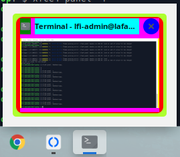
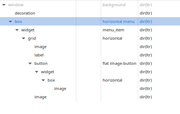
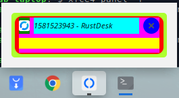
Here is the css I've been playing with for the moment:
box.menu.horizontal{
    background-color: greenyellow;
    border-radius: 10px;
    margin: 15px;
    padding: 5px;
}
box.menu>widget.active_menu_item.menu_item{
    background-color: red;
    border-radius: 10px;
    padding:0;
    margin:0;
}
box.menu>widget.active_menu_item.menu_item>grid{
    background-color: magenta;
    padding:0;
    margin:0;
}
box.menu>widget.active_menu_item.menu_item>grid>image:first-child{
    background-color: green;
    padding:0;
    margin:0;
}
box.menu>widget.active_menu_item.menu_item>grid>image:last-child{
    background-color: yellow;
    padding:0;
    margin:0;
}
box.menu>widget.active_menu_item.menu_item>grid>label{
    background-color: aqua;
    padding:0;
    margin:0;
}
box.menu>widget.active_menu_item.menu_item>grid>button{
    background-color: blue;
    padding:0;
    margin:0;
}
Thanks for your time and help, and for this awesome plugin!!
Edited by La-Fabrique-Info